
NewVersion 1.5
Work–Energy Lab
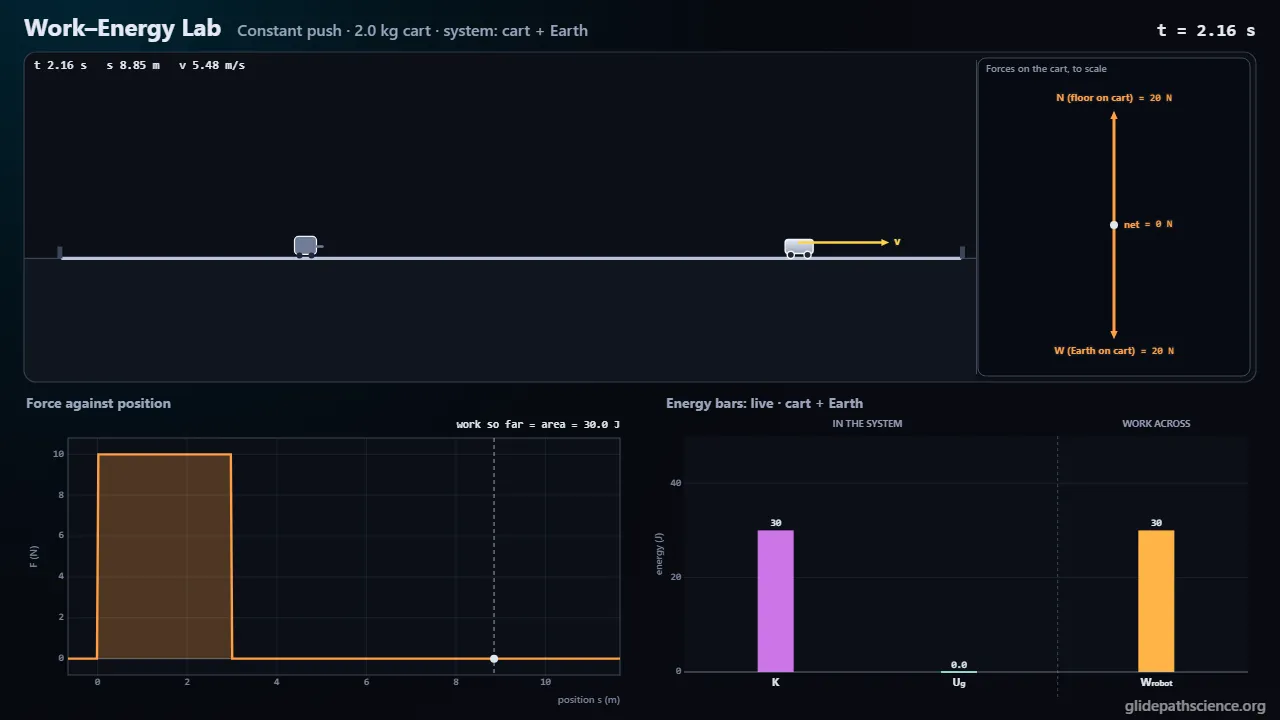
Work as the area under F(x): push a cart with a force you draw, launch it with a spring, stop it with friction, and follow every joule between kinetic, potential and thermal energy in the system you choose.
About this simulation
A cart on a track in one frame, the ground, with forces you control: a push robot that follows any force–position graph you draw, a launcher spring, gravity on ramps, hills, a valley, a loop and a ski jump, rough patches of real surface pairs, and a motor at constant speed or constant power, with air drag. The simulation adds up the work each force does as the area under its force–position graph, and live energy bar charts show kinetic, gravitational, elastic and thermal energy and the work crossing the boundary of whichever system you choose; the books always balance. A guided walkthrough runs in two tracks: an introductory one (work as force times distance and as area, its sign, the work–energy theorem, springs, gravity, friction, bar charts, the loop-the-loop and power) and an advanced one (work as an integral, potential energy and turning points, a position-dependent force that is not conservative, the energy equation for a system, the center-of-mass equation, constant power and drag). An Energy Bars tab lets students draw the system boundary by clicking objects, and a Path Lab compares the work gravity, friction and a swirling force do along different paths. A Concept Challenge (quick questions, building a bar chart, matching force graphs to speed graphs) and a Predict Lab (rounds with fresh numbers, shaping a push to hit a target speed, measuring a mystery surface with a launcher and a tape) give practice with points.
What you'll learn
- Calculate the work done by a force as F d cos θ for a steady force and as the area under its force–position graph for any force, with the correct sign.
- Use the work–energy theorem, W_net = ΔK, to find speeds and distances, including springs, gravity on any path and friction on rough surfaces.
- Choose a system and draw its energy bar chart, counting each force once: as work across the boundary, as potential energy inside, or as thermal energy.
- Tell conservative from nonconservative forces by the work they do around closed paths, read forces and turning points from potential energy curves, and relate power to work and speed.
What you can do
- Guided walkthroughStep-by-step, in Intro and Advanced tracks.
- SandboxEvery control of the model, to explore freely.
- Virtual labA realistic experiment with measurement noise and data analysis.
- Concept checksQuestions about ideas and vocabulary, with no calculating.
- PredictionCommit to a prediction, then see the result.
- Classroom demoProjector mode and recordable clips for slides.
- Works offlineA single downloadable file, verified to run without a network.
Before you start
- Newton's second law and free-body diagrams
- Kinematics in one dimension: displacement, velocity, acceleration
- Components of a vector, sine and cosine
- Reading and sketching graphs; the area under a graph
- For the advanced track: derivatives and integrals in one variable
Run or download
Run it in your browser
Nothing to install and no account. Works on laptops, Chromebooks, tablets, and phones.
Launch Work–Energy LabDownload for offline use
One HTML file (834 kB) that opens in any modern browser with no network: for rooms with unreliable Wi-Fi, or to keep a copy.
Download the fileFile details and checksum
- File
work-energy-lab-v1.5.html- Version
- 1.5, released November 15, 2026
- Build
197201f- Size
- 854,020 bytes
- SHA-256
afde97a71d3795eb40a25b970d5f4d04e3d09f337c7946fbb5c4286234d03f65- Offline
- Checked to run with all network access blocked.
The model and its limits
What the model assumes
- One inertial frame, the ground; the body is a particle moving along a track built from straight segments and circular arcs.
- Forces along the track: an applied push following a piecewise-linear F(x), gravity, an ideal linear launcher spring while in contact, kinetic friction μk N on rough straight patches with a static hold at rest, and a motor at constant speed or constant power with a force cap; air drag ½ρC_dAv² in the Lift scene only.
- The normal force includes the curvature of the track, N = m(g cos α + κv²); where it would turn negative the body leaves the track and follows a parabola.
- RK4 integration at 1 ms steps with exact events at every edge, handle, contact, stop and lift-off; each force's work is integrated and checked against its closed form, and the energy books balance to within a few parts in a billion.
- Friction coefficients come from the library's shared surface table; g = 9.81 m/s² (Moon 1.62, Mars 3.71); air density 1.2 kg/m³.
What it leaves out
- No rotational energy of wheels and no rolling resistance; air drag only in the Lift scene.
- Friction acts on straight sections only, and the model cannot say how thermal energy splits between the two surfaces.
- The spring is massless, undamped and without hysteresis; oscillation periods are not treated.
- When the body lands after leaving the track, the run stops; landings are not modeled.
- Sources (robot, winch, engine, muscles) are ideal stores apart from a fixed efficiency; tire grip is a fixed force cap.
- Other reference frames and relativity are left to Frame Shift; Earth's recoil is ignored.
- Friction coefficients come from the library’s surface table of approximate values typical of introductory physics tables; rubber on wet concrete, the road surfaces, and the vehicle and rider values are illustrative.
Cite this simulation
APA 7
Meier, D. (2026). Work–Energy Lab (Version 1.5) [Computer simulation]. Glidepath Science. https://glidepathscience.org/simulations/work-energy-lab/
MLA 9
Meier, David. Work–Energy Lab. Version 1.5, Glidepath Science, 2026, glidepathscience.org/simulations/work-energy-lab/.
AIP
D. Meier, Work–Energy Lab, version 1.5 (Glidepath Science, 2026), https://glidepathscience.org/simulations/work-energy-lab/.
BibTeX
@misc{meier2026workenergylab,
  author       = {Meier, David},
  title        = {{Work–Energy Lab}},
  year         = {2026},
  publisher    = {Glidepath Science},
  version      = {1.5},
  note         = {Interactive simulation, version 1.5},
  howpublished = {\url{https://glidepathscience.org/simulations/work-energy-lab/}},
  url          = {https://glidepathscience.org/simulations/work-energy-lab/}
}
Credits and license
Created by Dr. David Meier, Glidepath Science.
Licensed under Creative Commons Attribution-NonCommercial-ShareAlike 4.0 International (CC BY-NC-SA 4.0). You may share and adapt it for noncommercial purposes, such as teaching, with credit and under the same license. Licensing and reuse
AI tools (Claude, from Anthropic, and ChatGPT, from OpenAI) were used in developing Glidepath Science and its simulations. Dr. David Meier reviewed, edited, and modified every release version.