
NewVersion 1.3
Vectors, Relative Motion & Wind Triangles
Add and resolve vectors by dragging, then use them: cross a river, watch rain from a moving car, spot a collision course, and plan a flight the way pilots do with the wind triangle.
About this simulation
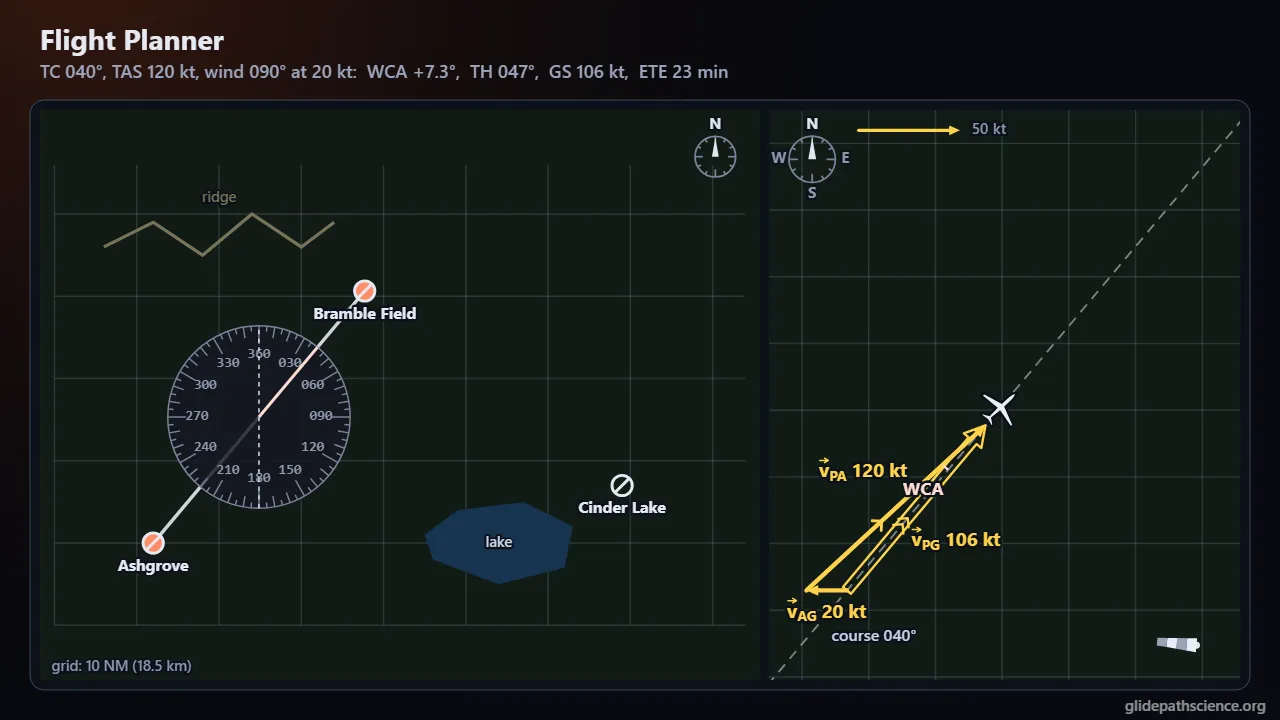
Vectors add tip to tail, never by their lengths alone, and every velocity belongs to a frame. Students drag and type vectors on a workbench, resolve them into components (and back, past the calculator’s quadrant trap), and switch between math angles and the bearings navigators use. Then they put relative velocity to work: a boat crossing a river aimed straight across, upstream to land opposite, or at the least-drift heading when the current outruns it, with a dock to land at; rain that falls straight down slanting across a car’s windows, seen from the ground and riding along; a ball tossed up on a train; and two aircraft whose relative track, closest approach, and constant-bearing collision course show out the windshield. A Flight Planner follows real flight-planning practice on a fictional training chart, marked not for navigation: true course from the plotter, the wind reported as the direction it blows from, the wind correction angle, true heading, groundspeed, and a nav log, with knots first and m/s alongside; the 1-in-60 rule and the clock method beside the exact triangle; and in Advanced, winds-aloft lines, magnetic variation, a deviation card, finding the wind from GPS, and runway crosswinds. An Advanced track adds the dot product as a component, the subscript chain both ways, a current fastest mid-channel, the out-and-back race behind Michelson and Morley, inverse problems, closest approach, and the model’s limits.
What you'll learn
- Add vectors tip to tail and by components, and explain why magnitudes add only for vectors pointing the same way.
- Resolve a vector into components and rebuild its magnitude and direction in the right quadrant, using math angles and bearings.
- Use the subscript chain for relative velocity to solve river crossings, rain seen from a moving car, and closest approach between aircraft.
- Solve the wind triangle for the wind correction angle, true heading, and groundspeed, and explain why heading and track differ.
What you can do
- Guided walkthroughStep-by-step, in Intro and Advanced tracks.
- SandboxEvery control of the model, to explore freely.
- Virtual labA realistic experiment with measurement noise and data analysis.
- Concept checksQuestions about ideas and vocabulary, with no calculating.
- PredictionCommit to a prediction, then see the result.
- Classroom demoProjector mode and recordable clips for slides.
- Works offlineA single downloadable file, verified to run without a network.
Before you start
- Right-triangle trigonometry: sine, cosine, and tangent, and their inverses
- Velocity as a rate of change of position
- For the Advanced track: the dot and cross products and basic calculus
Run or download
Run it in your browser
Nothing to install and no account. Works on laptops, Chromebooks, tablets, and phones.
Launch Vectors, Relative Motion & Wind TrianglesDownload for offline use
One HTML file (891 kB) that opens in any modern browser with no network: for rooms with unreliable Wi-Fi, or to keep a copy.
Download the fileFile details and checksum
- File
vectors-relative-motion-v1.3.html- Version
- 1.3, released November 15, 2026
- Build
f34958e- Size
- 912,102 bytes
- SHA-256
8d7930720dcfcd23d47cce9452d18e3515a0bcd4a4e0722e3ddbda0f305f75c7- Offline
- Checked to run with all network access blocked.
The model and its limits
What the model assumes
- Vectors in a plane: x east and y north on every map, x downstream and y across on the river, and x forward and y up in the side views.
- Galilean relative velocity between inertial frames; every velocity constant, so every run is closed form and exact.
- A wind from WD at W points downwind; the wind triangle is solved exactly (sin WCA = XW/TAS, TH = TC + WCA, GS = TAS cos WCA − HW), with no solution when the crosswind exceeds the airspeed.
- A river current uniform or fastest mid-channel along a parabola; for a fixed heading only its mean sets where the boat lands.
- Raindrops fall at a constant terminal speed in a uniform horizontal wind; the toss on the train has constant g and no air.
- Exact unit definitions: 1 kt = 1852/3600 m/s, 1 NM = 1852 m, 1 mph = 0.44704 m/s, 1 ft = 0.3048 m.
What it leaves out
- A flat local chart: no Earth curvature or converging meridians; great-circle routes are named, not drawn.
- One steady wind per leg: no change with height or time, no gusts or shear; climbs, descents, and turns are left out.
- True airspeed is given; indicated airspeed, density altitude, and fuel are not modeled.
- The chart, its isogonic line, its winds-aloft table, and the deviation card are fictional and illustrative: not for navigation.
- No airflow around the car deflecting the rain, no spread of drop sizes, and no waves or boat acceleration.
- Galilean addition only: no relativistic velocity addition; no accelerating or rotating frames.
Cite this simulation
APA 7
Meier, D. (2026). Vectors, Relative Motion & Wind Triangles (Version 1.3) [Computer simulation]. Glidepath Science. https://glidepathscience.org/simulations/vectors-relative-motion/
MLA 9
Meier, David. Vectors, Relative Motion & Wind Triangles. Version 1.3, Glidepath Science, 2026, glidepathscience.org/simulations/vectors-relative-motion/.
AIP
D. Meier, Vectors, Relative Motion & Wind Triangles, version 1.3 (Glidepath Science, 2026), https://glidepathscience.org/simulations/vectors-relative-motion/.
BibTeX
@misc{meier2026vectorsrelativemotionwindtriangles,
  author       = {Meier, David},
  title        = {{Vectors, Relative Motion & Wind Triangles}},
  year         = {2026},
  publisher    = {Glidepath Science},
  version      = {1.3},
  note         = {Interactive simulation, version 1.3},
  howpublished = {\url{https://glidepathscience.org/simulations/vectors-relative-motion/}},
  url          = {https://glidepathscience.org/simulations/vectors-relative-motion/}
}
Credits and license
Created by Dr. David Meier, Glidepath Science.
Based on: OpenStax, University Physics Volume 1, by Samuel J. Ling, Jeff Sanny and William Moebs: Chapter 2, “Vectors” (§2.1–2.4), and §4.5, “Relative Motion in One and Two Dimensions,” an open textbook licensed CC BY-NC-SA 4.0 (openstax.org). The Intro track follows its order of topics and its notation: the direction angle counterclockwise from the +x axis, components, the unit vectors î and ĵ, and the subscript chain for relative velocity. The wording, examples, numbers, figures, and simulations are the sim’s own. No endorsement by OpenStax or the authors is implied.
Licensed under Creative Commons Attribution-NonCommercial-ShareAlike 4.0 International (CC BY-NC-SA 4.0). You may share and adapt it for noncommercial purposes, such as teaching, with credit and under the same license. Licensing and reuse
AI tools (Claude, from Anthropic, and ChatGPT, from OpenAI) were used in developing Glidepath Science and its simulations. Dr. David Meier reviewed, edited, and modified every release version.